The mysterious SPItemEventProperties.AfterProperties

What you can/cannot access in BeforeProperties and AfterProperties in list event receivers can be mysterious.

Here is a very good/clear description of what you can expect when and where: http://www.synergyonline.com/blog/blog-moss/Lists/Posts/Post.aspx?ID=25

In addition to what’s in the above link, I found that for ItemUpdating and ItemUpdated, AfterProperties will contain:

  • Only fields that have changed IF the list item was being updated through code (e.g. your custom app)
  • All fields in the edit form, even if they have not been changed, IF the list item was being edit through the OOTB GUI.

The 2 behaviours above may be consistent with each other. An explanation could be that the OOTB GUI simply inserts all incoming values from the form into the item regardless of whether they were updated by the user.
Posted in SharePoint | Leave a comment

Can’t create SPSite object in SharePoint 2010: FileNotFoundException: The Web application at http://localhost could not be found. Verify that you have typed the URL correctly. If the URL should be serving existing content, the system administrator may need to add a new request URL mapping to the intended application.

I wrote my first console app against SP2010 in VS2010 the other day and ran into the above exception at the very first line:

using (SPSite site = new SPSite(http://localhost)

It turns out because my console app was targeting x86 and SP2010 is of course x64. Changing the console app to x64 (or Any CPU) in Project Properties \ Build solved the problem.

Posted in SharePoint | 2 Comments

Upload Multiple Documents in SharePoint stops working with Office 2010 clients

Problem: Uploading Multiple Documents into a Document Library in SharePoint doesn’t work on client machines with Office 2010 installed. You are able to drag & drop or browse for files, but when you click OK, the spinning icon just spins forever and the OK button remains greyed out. When uploading to the same Document Library but from a client machine with Office 2003, it works fine.

Obsereved with: Office 2010 on the client, SP 2007.

Cause/Solution: The multiple upload feature uses an ActiveX Control on the client machine (which seems to come with Office). There are changes with this control from Office 2003 to 2010, and 1 of these changes caused our customisation to break and hence led to the problem.

Due to a particular need, we were customising the tool bar of the Document Library and were rewiring the URL of the Upload Multiple Documents button. We changed the URL of this button to:

http://server/sites/11/01/9996661/_layouts/Upload.aspx?List={c102d3e7-bb6e-4b8a-9fc1-d525726fc101}&RootFolder=http%3a%2f%2fserver%2fsites%2f11%2f01%2f9996661%2fDocuments&[some other stuff]

The default OOTB URL is:

http://server/sites/11/01/9996661/_layouts/Upload.aspx?List=%7BC102D3E7%2DBB6E%2D4B8A%2D9FC1%2DD525726FC101%7D&RootFolder=%2Fsites%2F11%2F01%2F9996661%2FDocuments&[some other stuff]

There are 2 noticable differences above, 1st is the encoded list GUID and 2nd is the relative RootFolder. The latter is what caused the problem.

The 2003 ActiveX Control works with both absoluate or relative URLs (for RootFolder). The 2010 control however requires a relative URL.

Posted in Office 2010, SharePoint | 1 Comment

Changing custom timer job schedule in SharePoint 2010

Well actually this is really easy to do now in SharePoint 2010.

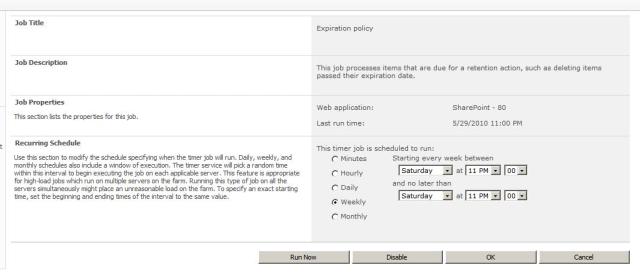
In Central Admin, go to Monitoring > Review job definitions > [job] and you get the setting screen below.


Notice that there is also a RUN NOW button – which will come in very handy for developers.

Neither of these were not possible through the UI in SP 2007.

Posted in SharePoint | Leave a comment

Can’t retract SharePoint timer job because the job "cannot be deserialized because it does not have a public default constructor"

If you forgot to include a default constructor in your timer job class, you will get the error below when activating the feature that installs the job:

SharePointProject1.TimerJobs.TrackingTimerJob cannot be deserialized because it does not have a public default constructor.

The problem is, if you were doing (and deploying) this through Visual Studio 2010, it will install and attempt to deploy the solution. During solution deployment however, feature activation will fail, but the solution will be marked as deployed anyway in SharePoint.

The problem is now you can’t retract/delete this solution from SP, because you will run into the error above.

To fix this, fix your timer class (i.e. include the default constructor), then un-GAC the assembly containing your timer job, then try retracting/deleting the solution and it will work.

Posted in SharePoint | Leave a comment

Properties missing from Visual Studio 2010 Intellisense..

Today I ran into a problem that made me think I was either blind, crazy.. or both.

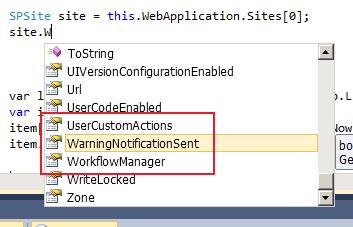
I created a new SharePoint 2010 project in Visual Studio 2010 and was trying to code against the SPSite.WebApplication property but it was not showing up in the Intellisense. I thought I found a bug with VS 2010…

It turned out this property is not visible in Intellisense because my SharePoint project is a “sandboxed” solution (and I think this is the default setting). Sandboxed solution is new to SP 2010: http://msdn.microsoft.com/en-us/library/ee539083.aspx.
Set the project to be a “normal” solution and the property I was looking for is visible in Intellisense. You can do this by clicking on the project file in the Solution Explorer, and set it in the Property window.
Posted in SharePoint, Visual Studio 2010 | Leave a comment

Intermittent "Object reference not set to an instance of an object" error when looping through SPListItemCollection

Today I ran into an issue where I intermitently get the following error when attempting to loop through a SPListItemCollection in a foreach loop:

Object reference not set to an instance of an object. at Microsoft.SharePoint.Library.SPRequest.SetVar(String bstrUrl, String bstrName, String bstrValue)
at Microsoft.SharePoint.SPListItemCollection.EnsureListItemsData()
at Microsoft.SharePoint.SPListItemCollection.Undirty()
at Microsoft.SharePoint.SPBaseCollection.System.Collections.IEnumerable.GetEnumerator()
at System.Linq.Enumerable.d__aa`1.MoveNext()
at System.Collections.Generic.List`1..ctor(IEnumerable`1 collection)
at System.Linq.Enumerable.ToList[TSource](IEnumerable`1 source)
at CAPS.Bll.Repositories.SharePointListRepositoryBase.GetItemsByQuery(SPQuery query)
….

I was looping through a collection that was returned using a CAML search. The error would occur after the 2nd or 3rd time running the same code.

It turned out that it was because my SPWeb object was being held in a static variable (it was an app page, not a console app), and the SPList was being accessed from this SPWeb. Changing the SPWeb to instance variable resolved the problem.

I think it’s probably safer to stay away from static variables in SharePoint dev, particularly if the code is going to run in a web context.

Posted in SharePoint | Leave a comment

Unit Test Adapter threw exception: System.Reflection.ReflectionTypeLoadException: Unable to load one or more of the requested types. Retrieve the LoaderExceptions property for more information.

The other day I came across this problem that I had not seen before. It was to do with running unit tests in Visual Studio 2008. All tests would fail with the exception:

Unit Test Adapter threw exception: System.Reflection.ReflectionTypeLoadException: Unable to load one or more of the requested types. Retrieve the LoaderExceptions property for more information.
The strange thing is that the tests would pass when run with debugging on.

It turned out that it was because the target assembly was signed, we had Code Coverage on, AND we did not specify a key for Code Coverage to re-sign with. Code Coverage is disabled in debugging – hence the problem only occurs when running without debugging!

It appears that Code Coverage needs to modify the assembly being tested. If the target assembly is signed, it will need to remove the key token, and re-sign it after it’s done. If you have Code Coverage on for multiple assemblies in the solution, then they will be all be re-signed with the same key. This means that your projects in the solution should be signed with the same key.

Posted in Unit Test | Leave a comment

Can’t see Site Settings even if you are a Farm and Site Collection Administrator?

So today I needed to investigate certain settings of a site collection in our dev environment. I went to the web site but cannot see Site Settings in the Site Actions menu at all. I checked Central Admin and I am a Farm Administrator, as well as Site Collection Administrator for that site collection. When I used SharePoint Mananger (SPM) to update a property of a list I get an Unauthorised Exception. I knew this was not normal because I know I should be able to update this property through SPM.

It turns out the site collection was locked.

Use this command to check if the site is lock:

stsadm -o getsitelock -url http://server/siteCollection

If the site is lock, use this command to unlock it:

stsadm -o setsitelock -url http://server/siteCollection -lock none

Site Settings came back, and everything else was the way they should be after I unlocked the site collection.

Posted in SharePoint | Leave a comment

Problem with Document Information Panel and SharePoint Lookup Columns

I have been troubleshooting an issue where Word 2007 could not open/load the Document Information Panel when a new document is created from SharePoint (MOSS 2007).

The error message you’d get from Word is

Document Information Panel cannot create a new, blank form.

Document Information Panel cannot open the form. To fix this problem, contact your system administrator.

Form template: http://corp/sites/03/01/6900029913/proppanel.xsn

 
The following DataObject either cannot be created or cannot be initialized: list_1A6E8C1A-DB5C-428E-9DE1-941E6A836C05

 
Document Information Panel cannot add the following object to the DataObjects collection: list_1A6E8C1A-DB5C-428E-9DE1-941E6A836C05
list_1A6E8C1A-DB5C-428E-9DE1-941E6A836C05 could not be added to the DataObjects collection.

 
The following item already exists in the collection: list_1A6E8C1A-DB5C-428E-9DE1-941E6A836C05

or

The query cannot be run for the following DataObject: list_1A6E8C1A-DB5C-428E-9DE1-941E6A836C05

 
Document Information Panel cannot run the specified query.

 
The SOAP response indicates that an error occurred on the server:

 
Exception of type ‘Microsoft.SharePoint.SoapServer.SoapServerException’ was thrown.

 
0x82000006

 
List does not exist.

 
The page you selected contains a list that does not exist. It may have been deleted by another user.
 
It turns out that this was caused by “bad” lookup fields attached to the content type (as you know – the Document Information Panel lets you specify value for these fields straight in Word when editing the document).
 
When there are more than 1 “bad” field, you get the first message. When there is just 1 “bad” field you get the second one. Don’t ask me why.
 
In this instance, these lookup fields were “bad” because in their XML schema, the GUID of the source lists they are pointing to is “invalid”. These GUID needs to be enclosed in {} in the XML schema of the field. You cannot tell whether these lookup fields are “bad” by looking through the SharePoint UI.
 
OK let me clarify.
 
Use SharePoint Manager 2007 (SPM) to browse to the SharePoint list and examine the SchemaXml property of that lookup field. Notice the List=”f7d54276-e103-4b84-8a1e-fe31515325b4″ attribute in this xml.
 
Change it to List=”{f7d54276-e103-4b84-8a1e-fe31515325b4}” and try creating the document from SharePoint again (remember to check this for all lookup fields of the content type). Also, remember to do this at the SharePoint document list level (rather than the site level for example) – as this is where it counts. This immediately solved the problem for me.
 
So how come these {} went missing?? In this instance it was because we did not have them in the feature manifest that created these fields.

Posted in Document Information Panel, Lookup Columns, SharePoint, Word 2007 | Leave a comment