Does iterating through SPList.Items using foreach affect performance?

Iterating through SPList.Items using a for (int i) loop is bad for performance, as each call to SPList.Items causes a trip to the DB and will retrieve all items. See http://blog.dynatrace.com/2009/01/11/the-wrong-way-to-iterate-through-sharepoint-splist-items/.

I have always wondered whether using a foreach loop would cause the same issue.

I decided to use TypeMock to find out. My plan is to create a fake list, then setup the fakeList.Items property so that when called, it will invoke a substitute method instead. This substitute method will increment a count each time it is invoked, and return the fakeList.Items property.

Here is my setup code.

int itemsCallCount = 0;
SPListItemCollection itemCollection;

[TestMethod]
public void TestMethod1()
{
	//Create a fake list 
	var fakeList = Isolate.Fake.Instance<SPList>();

	//Setup the fakeList.Items so that when fakeList.Items.GetEnumerator() is called, 3 items will be returned. 
	//This is because GetEnumerator() is what will be called in the foreach loop.

	SPListItem[] items = new SPListItem[3];
	IsolateFaker.FakeEnumeratorElements<SPListItem>(fakeList.Items, items);

	//Setup the fakeList.Items.Count also. This is what will be used in the for (int i) loop.
	Isolate.WhenCalled(() => fakeList.Items.Count).WillReturn(3);

	//Save the setup of fakeList.Items. This is what we will return in our substitue tracking method.
	itemCollection = fakeList.Items;

	//Hook in our substitue method so we can track the calls to fakeList.Items.
	Isolate.WhenCalled(() => fakeList.Items).DoInstead((context) => ReturnItemCollectionAndTrackCount(context));
}

private SPListItemCollection ReturnItemCollectionAndTrackCount(MethodCallContext context)
{
	itemsCallCount++;
	return itemCollection;
}

IsolateFaker.FakeEnumeratorElements() is a helper method I wrote that is not included here for brievity.

Here is my test target:

public int IterateUsingForEach(SPList list) 
{ 
	int count = 0; 
	foreach (SPListItem item in list.Items) 
	{ 
		var temp = item; 
		count++; 
	} 
	return count; 
}

public int IterateUsingForInt(SPList list)
{       
	int count = 0;
	for (int i = 0; i < list.Items.Count; i++)       
	{         
		var temp = list.Items[i];         
		count++;       
	}       
	return count;     
}

Here is my actual unit test method:

//Test using foreach. This will pass.         
Target target = new Target();       
Assert.AreEqual(3, target.IterateUsingForEach(fakeList));
Assert.AreEqual(1, itemsCallCount);

//Test using for (int i). This will fail.
itemsCallCount = 0;       
Target target2 = new Target();
Assert.AreEqual(3, target2.IterateUsingForInt(fakeList));
Assert.AreEqual(1, itemsCallCount);

So what’s the conclusion? Foreach invokes the Items property once. For (int i) invokes the Items property 7 times. This means using Foreach does not cause the performance issue as for (int i) would.

Heck, if you know the CLR/MSIL well enough you probably already know the answer – but nevertheless it was interesting to play around with the Typemock stuff :D.
Posted in SharePoint, TypeMock | Leave a comment

The IT-enabled future

I am doing a Master of Business Informatics at the University of Canberra and next week I have to do a 5min semi-formal presentation on what the IT-enabled future might look like.

Adding my own speculation to research I have been doing, this is what I came up with:

I believe the trends we are seeing today are related, and together they are building up to something significant. I believe one day they will converge to have a major impact on the way we use technology. These trends are:

  • Social computing: at its heart, this is about the collective intelligence. Organisations are yet to fully leverage this for their internal business.
  • IPv6: I refer to this as device connectivity. This will give us many more connected devices, with new applications, and more importantly new ways of capturing, using and exchanging data.
  • Cloud computing & increasing bandwidth: together these mean processing power. The subtle significance here, I believe, is that they give rise to the thin client where apps are hosted remotely and data are stored remotely. This could increase opportunities for data sharing, process integration and standardisation.
  • Mobile computing: An extension of the thin client. I call this accessibility as it allows people to access information and services from anywhere – at anytime.
  • Natural user interface: Good examples being MS Surface and XBox Kinect. This will allow us to be more expressive when using technology.

So what would happen if collective intelligence, device connectivity, processing power, accessibility and expressive start to converge? I believe they will give rise to 2 things:

  • Immersive computing: where computing will be more natural and pervasive throughout our daily life
  • Hyper-connectivity: where we, more than ever, will be connected to each other, information and services.
Posted in Stuffs | Leave a comment

What is the essence of TDD?

It kinda irritate me when people talk about TDD being write test first before you write code – and simply stop there. I don’t think this sufficiently captures the essence of TDD, and I suspect that in some cases this is simply regurgitation of some textbooks.

To me TDD is also:

  1. Treat unit testing as a first class process in the SDLC
  2. Use unit test as a key quality control mechanism
  3. Design your code and architecture so that it is testable
  4. Treat and maintain test code as first class citizen

What is TDD to you?

Posted in TDD | Leave a comment

File not found error when going to Site Settings of subsite

I had a fresh installation of SharePoint 2010 and everything was all fine. I created a subsite and that was fine too – until I went into Site Settings of the subsite. SharePoint gave me the error below:

File Not Found.

Troubleshoot issues with Microsoft SharePoint Foundation.
Correlation ID: 2cd97b26-9dba-4e52-af70-9b886367690a
Date and Time: 10/13/2010 11:02:37 PM

Going into Site Settings of the root web was still fine though.

Googling this will show that the problem is because Alternate Access Mapping (AAM) is not properly configured. What annoyed me was that no one went into the details of how to configure it properly (OK! so I was a newbie and didn’t know how).

You can configure AAM by going to Central Admin, then System Settings, then Configure Alternate Access Mappings. In here, you need an entry that matches the URL you are using to visit the subsite. Explanation below.

When you install SharePoint, it will automatically add an entry with your computer name, e.g. http://mycoolserver/. If you were using this URL to access you Subsite (i.e. http://MyCoolServer/Subsite1/_layouts/setting.aspx) then everything will be fine and you don’t need to do anything.

However, if you are like me, then you’d be access it using http://localhost/Subsite1/_layouts/setting.aspx, in which case it will not work, and you will need to add http://localhost/ as an entry to the AAM list.

This configuration will also affect SharePoint Designer. I posted about a problem in SharePoint Designer where you get an error when editing a list form if you opened the site using http://localhost/ (http://bernado-nguyen-hoan.blogspot.com/2010/09/can-edit-list-forms-in-sharepoint.html). It turns out you can get this to work by configuring AAM as above.

Posted in SharePoint | 7 Comments

OMG!! My first Wikipedia edit!!

Oh my god! I just made my first ever Wikipedia edit!

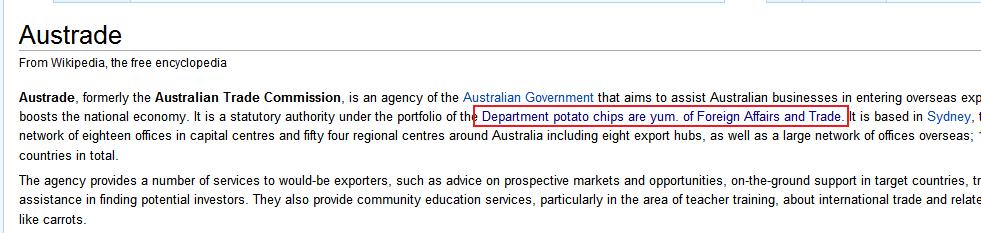
While searching for info on Austrade (Australian Trade Commission), I came across this page on Wikipedia:

I edited the page to remove the bit in red.

Now I have officially contributed to the Web 2.0 movement!! Woohoo!

Posted in Stuffs | Leave a comment

Can’t see deployed custom field

OK so I couldn’t come up with a concise post title that describes the problem!

I was writing XML to deploy a number of custom fields through a feature. The feature activated fine. Two of the three fields were visible in the Site Columns gallery. The 3rd just wasn’t there!

It turns out because I forgot to have the DisplayName attribute in my <Field> XML! There was no error messages whatsoever! Thanks a lot SharePoint! >:[

And another thing that bugs me is Field vs Column. In everyday speak – what should I be using to refer to custom Field/Column? (I finally got my head around Site vs Web!!)

Posted in Custom Fields, SharePoint | Leave a comment

Can’t edit list forms in SharePoint Designer: soap:ServerServer was unable to process request. —> Value does not fall within the expected range.

In SharePoint Designer 2010 I would always get the error message below when I try to open any list form (DispForm.aspx, EditForm.aspx, etc) for editing.

soap:ServerServer was unable to process request. —> Value does not fall within the expected range.

It turns out that this was because I used http://localhost/ to open the site.

Opening the site using http://hostname/ immediately solves the problem.

—————————-
13/10/2010 Update: You can use http://localhost/ and not get this problem by adding http://localhost/ as an entry to the Alternate Access Mappings in Central Admin.

Posted in SharePoint, SharePoint Designer | 1 Comment

LINQ to SharePoint and transaction

In SharePoint 2010 you can use LINQ to insert items into a list like this:

using (var context = new DataEntitiesDataContext(http://localhost/))
{
       var item1 = new MyListItem();
       item1.Comment = “Item 1”;

       var item2 = new MyListItem();
       item2.Comment = “Item 1”;

       context.MyList.InsertOnSubmit(item1);
       context.MyList.InsertOnSubmit(item2);
       context.SubmitChanges();
}

You might be forgiven to ponder whether the above code would support transaction. I know I did! (especially after a user group presenter told me that yes it would).

I tried it out and it doesn’t.

I guess I shouldn’t have even thought about it, since this is being translated to CAML at the end of the day.

It still remains that if you require transaction support, then SharePoint is not for you :D.

One interesting thing I picked up during testing is that the code correctly raised exceptions on column validation errors and unique constraints – but did not fail on required fields. It happily inserted the item into the list with the required fields missing.

Posted in LINQ, SharePoint | 2 Comments

Class needs to be public for WSPBuilder to add as SafeControl

When WSPBuilder builds the WSP package, it looks through all the classes in the assembly. If it sees any class that inherits from WebControl (and perhaps also Control/UserControl?), it will automatically instruct the manifest to add the assembly to the SafeControl list in the target web app’s web.config. This means when this WSP is deployed, you can go ahead and use these controls in SharePoint without having to manual edit the web.config.

Today I found that WSPBuilder will only do this if the class is public. If you don’t specify anything then, in C#, the visibility is internal and it will not be picked up by WSPBuilder.

Posted in WSPBuilder | Leave a comment

Open Command Window Here in Windows Explorer – this is COOL!

OK here’s something cool I learnt at TechED AU.

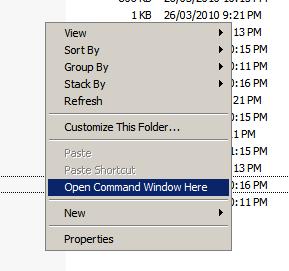
In Windows Server 2008, in Windows Explorer, if you hold down the Shift key and right click on the content listing of a folder (i.e. the right pane), you will get a new “Open Command Window Here” option in the context menu.

Yes yes there are some shell extensions out there that you can install to get this without having to hold down Shift, but this is nice in environments where you are not allowed to install stuffs.

Also, if you do the same thing on a file, you will get a new “Copy as Path” option in the context menu :D.

Apparently this works on Vista, so hopefully it works on Win7 as well, but I have not had a chance to try it on these OSes.

Posted in Windows Server 2008 | Leave a comment