How to enable Export on custom SharePoint web part

By default your custom SharePoint 2010 web parts will not have the Export command enabled. To enable this command, in your .webpart file, add the following element in the <properties> section:

<property name=”ExportMode” type=”exportmode”>All</property>

Posted in SharePoint 2010, WebPart | Leave a comment

Free alternative to Reflector!

So happy I found this had to blog about it: http://wiki.sharpdevelop.net/ilspy.ashx.

Still in Beta but looks very promising. Woohoo!

Posted in Stuffs | Leave a comment

Can’t get UpdatePanel in your web part to do AJAX-postback?

If your web part is creating the UpdatePanel dynamically, e.g. in the CreateChildControls() method, check that:

  1. The UpdatePanel has an ID assigned
  2. The UpdatePanel’s UpdateMode property is set to Conditional. The default is Always.
  3. The control triggering the postback (e.g. a button, or a linkButton) has an ID assigned
Posted in AJAX, SharePoint 2010, WebPart | Leave a comment

Can’t get RemoveFieldRef in your custom content type schema to work?

Check that:

  1. The Inherits attribute in <ContentType> is FALSE
  2. Check the casing of the GUID specified in <RemoveFieldRef>. My testing shows that this is case-sensitive.
On the latter point above, it is best to write a harness program to check the GUID of the field currently installed on SharePoint. Case-sensitive… jeez what were they thinking??
Posted in Content Types, SharePoint | Leave a comment

Error occurred in deployment step ‘Activate Features’: Object reference not set to an instance of an object.

If you are getting this error when deploying your solution using Visual Studio, then check that your feature receivers you are not using objects that would be null when the code is not running under an HTTP context. SPContext.Current for example would be null.

Posted in SharePoint 2010 | Leave a comment

How to set AvailableWebTemplates to custom WebTemplate created via features

In SharePoint 2010 you can use the new <WebTemplate> element in a feature to create a custom web template (sort of equivalent to site definition). Good overview of how this compares to other methods of creating site template/definition: http://sharepointchick.com/archive/0001/01/01/site-definitions-vs.-webtemplates.aspx.

In a web template or site definition you can use the AvailableWebTemplates property of the Publishing feature (22A9EF51-737B-4ff2-9346-694633FE4416) to restrict the web templates that can be used to create sub sites under the given site.

Use the naming convention “*-{FeatureID}#{WebTemplateName};*-{FeatureID}#{WebTemplateName}” to refer to your custom WebTemplate in the value of this property. FeatureID should be wrapped in { }, and there have been reports that it should be upper-case.

Leave the value of this property blank to allow all web templates (if the web was a root web), or inherit from parent’s settings (if the web was a sub web).


Posted in SharePoint 2010, WebTemplate | Leave a comment

How to force Expiration/Retention policy to execute on SharePoint 2010

The Expiration/Retention policy (part of Information Management Policy) is executed by a couple of timer jobs. In 2007 these jobs are under the PolicyConfigService at the Farm level, and you can modify the schedule of these jobs to run very frequently for debugging purposes (e.g. http://blah.winsmarts.com/2008-10-Authoring_custom_expiration_policies_and_actions_in_SharePoint_2007.aspx – you will need to search for the PolicyConfigService by name though, as the ID will be different for each farm).

In 2010 these timer jobs are no longer at the Farm level, but instead at the WebApplication level. You can force these to run using the following code:

using (SPSite site = new SPSite("http://sharePointServer"))
			{
				List<string> jobNamesToRun = new List<string>()
													{
														"Information management policy",
														"Expiration policy"
				                                   	};

				foreach (var name in jobNamesToRun)
				{
					var job = site.WebApplication.JobDefinitions.FirstOrDefault(
						j => j.DisplayName.Equals(name, StringComparison.InvariantCultureIgnoreCase));

					if (job != null)
					{
						Console.WriteLine("Running job '{0}'", name);
						job.RunNow();
					}
				}
			}
Console.WriteLine("Enter..");
Console.ReadLine();

It is important to execute the “Information management policy” job before the “Expiration policy” job. The first evaluates and set the expiration date for list items. The second is the job that actually executes the defined expiration action (e.g. run a workflow, etc).

Posted in Information Management Policy, SharePoint 2010, Timer Job | 4 Comments

AutoSPInstaller keeps installing SharePoint binary after restart

AutoSPInstaller (http://autospinstaller.codeplex.com/) is a neat tool for unattended SharePoint install and configuration. I ran into an issue where AutoSPInstaller just seems to get stuck in a loop. After SP is installed, it prompted me to restart the server and re-run the script. I did this, but when I re-run the script it installs SP again and the loop goes on.

This problem was caused by the fact that I was running the AutoSPInstaller script under a 32 bits process.

In the AutoSPInstaller script, there is a line that looks like this:

If  (Test-Path “$env:CommonProgramFiles\Microsoft Shared\Web Server Extensions\14\BIN\stsadm.exe”) #Crude way of checking if SP2010 is already installed

This line checks if the file stsadm.exe exists to determine if SP has been installed. If the file is not found, the script goes ahead and installs SP.

The problem is in the $env:CommonProgramFiles part, which is different under 32 vs 64 bits. This is why in my case the script keeps trying to install SP each time it is re-ran.

So how did I manage to run the script under a 32 bits process? Because I launched the script from an HTA :), and by default HTA launches under a 32 bits process. As a quick fix for this, I created a batch file that launches the 64 bits version of the HTA instead – which is at C:\Windows\System32\mshta.exe.

Posted in AutoSPInstaller, SharePoint 2010 | Leave a comment

Pass-through XSL for debugging

When debugging certain webparts (e.g. CQWP), you often want to see the raw XML before the XSL is applied. The XSLs below (developed by a colleague) will spit out the original XML.

<xsl:stylesheet version="1.0" xmlns:xsl="http://www.w3.org/1999/XSL/Transform">
	<xsl:output method="xml" version="1.0" encoding="UTF-8" indent="yes"/>
	<xsl:template match="/">
		<xmp>
			<xsl:copy-of select="*"/>
		</xmp>
	</xsl:template>
</xsl:stylesheet>


This one below renders the XML as a table, with each entity as a row, and each attribute as a column. This would only work if the XML is a single list of entities, and the entities have no child entities.

<xsl:stylesheet version="1.0" xmlns:xsl="http://www.w3.org/1999/XSL/Transform">
	<xsl:variable name="UTCTime" select="/Rows/queryData/CurrentTimeUTC" />
	<xsl:template match="/">
		<Table>
			<xsl:for-each select="//row">
				<TR>
					<xsl:for-each select="@*">
						<TD>
							<br />
							<B>
								<xsl:value-of select="name()" />
							</B>
						</TD>
						<TD>
							<xsl:value-of select="." />
						</TD>
					</xsl:for-each>
				</TR>
			</xsl:for-each>
			<tr>
				<td></td>
			</tr>
		</Table>
	</xsl:template>
</xsl:stylesheet>
Posted in WebPart, XSL | 1 Comment

Complex formatting for BCS TypeDescriptor with complex type

I was playing around with specifying ComplexFormatting and FormatString for my BCS model entities. Here are the lessons learnt:

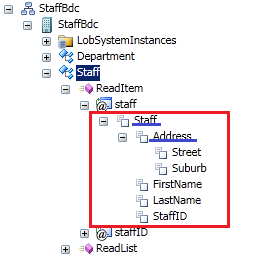
  1. The ComplexFormatting property must be specified at the parent TypeDescriptor containing the complex type, not at the complex type TypeDescriptor itself. So for the model below, the ComplexFormatting property must be specified for the Staff TypeDescriptor, not Address.

  2. The ComplexFormatting property seems to have effect as long as it is specified, regardless of its value. This link http://msdn.microsoft.com/en-us/library/ff464405.aspx shows that the type of this property is Boolean. Most entries on the web however show that this property can be of type String, and can have an empty value. I have tested both, and they both work. Furthermore, setting the type to Boolean and specifying a value of false does not disable complex formatting.
  3. The FormatString property must be specified on the complex type TypeDescriptor. In the screenshot above, it needs to be specified on Address.
  4. I could not get complex formatting to work with SP external lists. I can only get the formatted value in custom code when calling entityInstance.GetFormatted(“Address”).

This article on MSDN gives an overview of the various options for dealing with complex type in BCS and pros/cons of each: http://207.46.16.248/en-us/library/ff798441.aspx.

Posted in BCS, SharePoint 2010 | Leave a comment